7-day free trial · no card required

Try the full desktop workflow.
Buy it only if it fits.

Explore AI culling, duplicate cleanup, RAW processing, batch editing, and local export free for 7 days. After that, keep everything for one small payment.

No card required
7 full days
Product key delivered instantly
Free desktop trial

Use every core feature for 7 days free

Enter your email to create a time-limited activation key. Download the installer, activate the app, and see how imagic handles your own photos before spending anything.

No credit card Windows & macOS Local, private processing One trial per email

Your key appears immediately. No payment details required.

Download imagic Desktop
Download the installer and start a free 7-day trial. If it fits, the same one-time $10 license works on every platform.

Windows

Full installer with RawTherapee RAW processing included.

Download for Windows

macOS

Universal DMG for Apple Silicon & Intel Macs. Includes RawTherapee.

Download for macOS

Linux users: pip install imagic — native packages coming soon.

View Changelog & Release Notes

Why the desktop app is worth buying
This is the full imagic experience: speed, automation, editing depth, and local ownership.

Unlimited local photo jobs

No web quotas, no upload waits, and no image-count ceiling. Point imagic at a folder and let it churn through the job on your own machine.

The full editor stack

Histogram, manual controls, color grades, scene-aware presets, and export from the same edit pipeline. What you see is what gets exported.

CLI and automation ready

Batch jobs, headless runs, and crash-resilient export make it practical for real shoots, not just casual browser sessions.

RawTherapee included

Both the Windows and macOS installers ship with RawTherapee built in for full RAW demosaicing (CR2, NEF, ARW, TIF and more) with zero extra setup.

AI that keeps learning

Your keep/trash decisions and editing choices feed back into the desktop workflow so the assistant gets closer to your taste over time.

Simple commercial model

One payment. One product key. No subscription fatigue, no seat dashboard, and no vendor lock-in just to cull and edit your own work.

What you get immediately

  • Secure checkout for the desktop license
  • Product key delivered by email
  • Direct installer download link
  • Key-based activation on first launch
  • Automatic key transfer when moving to a new device

Activation behavior

The product key is saved on the device after activation. If you later activate the same key on another device, the earlier activation stops working. That gives you a clean transfer path without allowing one key to stay active everywhere.

That matches the app-side enforcement already built into the licensing backend and startup gate.

Common questions
Everything you need to know before buying the imagic Desktop license.
Is this a one-time payment or a subscription?

Start with the free 7-day trial — no card required. Then pay $10 once and own the license forever. No monthly charges, annual renewal, or price increases.

How quickly do I receive my license key?

Your license key and installer download links are emailed automatically once Stripe confirms payment, typically within 1-2 minutes. Check your spam folder if you don't see it. The key is also displayed on the confirmation page.

Can I use the license on multiple computers?

Your license activates on one machine at a time. When you activate on a new device, the previous device is automatically deactivated. This makes switching to a new computer seamless, with no support ticket required, just activate on the new machine.

Which operating systems are supported?

imagic Desktop runs on Windows, macOS, and Linux. The same license key activates on any platform. You can also install via Python: pip install imagic.

Is RawTherapee included?

Yes. Both the Windows and macOS installers ship with RawTherapee built in, giving you true RAW demosaicing for CR2, NEF, ARW, and other formats with zero extra setup. On Linux you can point imagic at your own RawTherapee install for the same RAW pipeline.

Do I need an Adobe account or internet connection?

No Adobe account, no Creative Cloud, no internet required after activation. imagic is completely independent of Adobe. All processing happens locally on your machine, so your photos stay private and speeds are limited only by your hardware.

What payment methods are accepted?

Payments are processed securely by Stripe. All major credit and debit cards are accepted: Visa, Mastercard, American Express, and more. The checkout is PCI-compliant and your card details are never stored by imagic.

Is there a free trial before buying?

Yes. The free trial gives you 7 days to use the desktop workflow with your own photos. No credit card is required. Enter your email above, copy the trial key, download the installer, and activate it on first launch.

Installing imagic on macOS

Your download has started. Follow these steps to install and open the app.
1
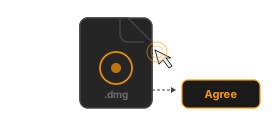
Double-click the DMG file and agree to the EULA

Open the DMG

Once the download finishes, double-click imagic-desktop.dmg in your Downloads folder. You'll see the EULA — click Agree to continue.
2
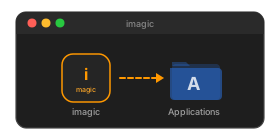
Drag imagic to the Applications folder

Drag to Applications

In the window that opens, drag the imagic icon onto the Applications folder shortcut. This copies the app to your Mac.
3
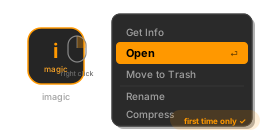
Right-click the app and choose Open

First launch — right-click to open

Open Applications in Finder, find imagic, then right-click → Open. macOS may show a warning the first time because the app is from outside the App Store — click Open to confirm.
You only need to do this once. After the first launch, imagic opens normally with a double-click.
4
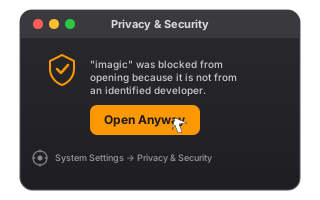
Open Privacy and Security settings and click Open Anyway

If blocked — allow in Privacy & Security

If macOS still won't open the app, go to System Settings → Privacy & Security, scroll down to the Security section and click Open Anyway next to the imagic message. Then try launching the app again.
This happens because imagic is distributed directly, not through the Mac App Store. It's safe to allow.
5
Enter your product key to activate imagic

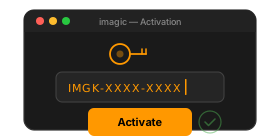
Activate with your product key

On first launch, enter the product key from your email to activate imagic. RawTherapee is already bundled inside — no extra setup needed.